Showing posts with label windows10. Show all posts

Monday, 30 October 2023

symbolic link and windows symbolic link

 sym link

https://www.freecodecamp.org/news/linux-ln-how-to-create-a-symbolic-link-in-linux-example-bash-command/

ln -s existing_source_file optional_symbolic_link


in windows, open git bash, and select run as admin,

then cd to ur dir. c drive will be cd \c

when pointing to another location use quotes :


ln -s 'C:\Program Files\OpenSSL-Win64\bin\openssl.exe' openssl.exe


Wednesday, 2 November 2022

tracert(windows) and tracepath(linux)

 tracert  : windows to trace host

tracepath: linux


they are all built in


https://askubuntu.com/questions/891179/how-to-install-traceroute-in-linux

Monday, 11 July 2022

Add IP domain entries to windows/ubuntu, ubuntu add DNS server

 All OS uses


/etc/hosts


<IP>  <DOMAIN_NAME>


Ubuntu add DNS server:

https://askubuntu.com/questions/130452/how-do-i-add-a-dns-server-via-resolv-conf


vim /etc/resolv.conf

nameserver 8.8.4.4


Tuesday, 19 October 2021

Remote Desktop get to lock screen

 ctrl alt delete does not work on remote desktop for lock screen


use ctrl alt end 


https://serverfault.com/questions/57222/how-to-send-ctrlaltdel-using-remote-desktop

Thursday, 14 October 2021

Hyper V how to increase hard disk && Unable to Edit hard disk due to check points

 https://www.zubairalexander.com/blog/how-to-expand-hard-drives-in-hyper-v-virtual-machines/


Expanding a Virtual Hard Disk in Hyper-V

Before you do anything else, you first need to shut down the virtual machine. Then you will expand the disk to increase its capacity.

  1. Start Hyper-V and shutdown the VM that’s running out of disk space.
  2. Once the VM is off, right-click the VM and select Settings.
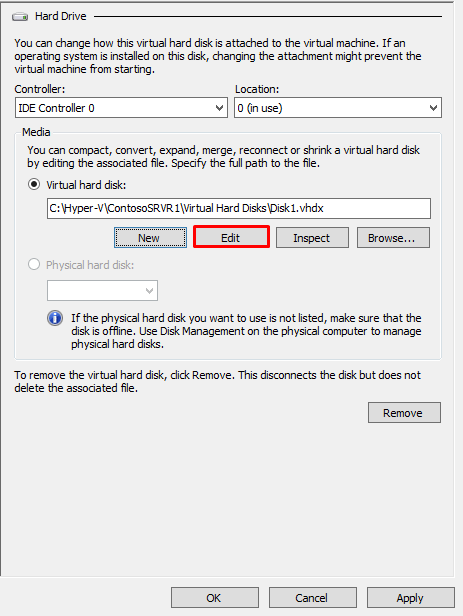
  3. Select the virtual hard disk that you want to expand and click Edit.
    NOTE: If Edit is grayed out then the VM is probably still running. Another reason that you may not be able to edit the hard disk is that you may have one or more checkpoints for the VM, in which case you will see an error Edit is not available because a checkpoint exists for this virtual machine. If you want to keep the changes in the checkpoint then merge the checkpoint by applying it, or to discard the changes simply delete the checkpoint and wait until the merge is complete then properly shutdown the VM. Do not use the Turn Of option in Hyper-V, use the Shut Down option.
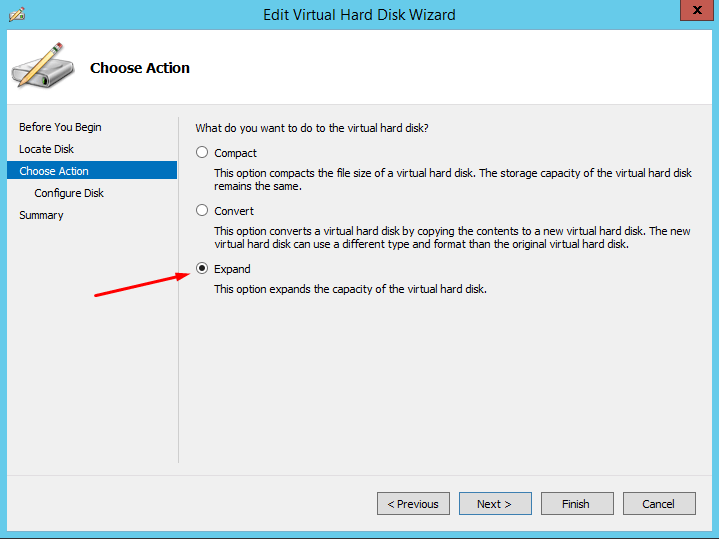
  4. When you edit the disk, a wizard will walk you through the steps. On the Choose Action screen select Expand.Expanding Hyper-V machine
  5. On the next screen specify the size you want for the new disk, e.g. 300 GB and then click Finish. This will double the size of our drive C from about 150 GB to 300 GB.

Unable to Edit hard disk due to check points


https://community.spiceworks.com/topic/1326601-hyper-v-how-can-i-increase-hdd-size-on-an-existing-vm


delete checkpoints and snap shots

The issue is that your VM has 1 or more snapshots. You should not run a VM with snapshots for long periods of time; generally just a few days. Running snapshots in production is a very bad idea.

Tuesday, 5 October 2021

Windows .exe consle application

https://stackoverflow.com/questions/13681609/ive-downloaded-an-exe-file-but-it-closes-quickly-as-it-opens 

https://www.architectryan.com/2018/03/17/add-to-the-path-on-windows-10/


some .exe is GUI application in windows, such that when you click, a GUI window will be opened for you to do things.


Some .exe such as nuget.exe are console application, such that when PATH of them has been set correctly, in powershell or commandline tool, u can directly type the command such as NuGet to trigger them


To set PATH correctly, need to 

  • Open the Start Search, type in “env”, and choose “Edit the system environment variables”:
  • Click the “Environment Variables…” button.
  • Under the “System Variables” section (the lower half), find the row with “Path” in the first column, and click edit.
  • The “Edit environment variable” UI will appear. Here, you can click “New” and type in the new path you want to add. From this screen you can also edit or reorder them. (For example the path to nuget.exe)

Tuesday, 7 September 2021

Windows File Server - access in windows and linux

 Windows File Server

https://www.myworkdrive.com/file-server/windows/

Microsoft Windows File Server has come a long way from its initial debut in the early 1990’s.   In the initial release a Windows File Server used NetBios with NetBeui over Novell’s IPX/SPX protocols as it’s transport mechanism over network.  File Server access was restricted to the local area network.   In 1993, the internet and TCP/IP protocols were introduced allowing for the possibility of remote access to Window File Server Shares.    Microsoft quickly embraced these protocols giving it a jump over the more popular Novell file server at that time.

The Windows File Server role allows customers to share files using attached storage and integrates seamlessly with Active Directory with NTFS permissions.   Files are served to end users over SMB file shares that can be mapped as drives or accessed by UNC paths.   Mapped drives can be easily deployed to users as they login to their domain joined Windows PC’s through login scripts or group policy rules.


 Windows File Server - Access in Windows

https://unix.stackexchange.com/questions/141335/how-to-access-windows-file-server-from-linux

Windows->File Exploer : \\bioinf-filesrv2.mycompany.fr(OR IP)\cluster15


 Windows File Server - Access in Linux

Shell shell scripting :  


$ mount -t cifs -o username=myuser,password=mypass //bioinf-filesrv2.mycompany.fr/cluster15 /mnt

Tuesday, 29 June 2021

GIT command not recognized in VS code terminal

 https://stackoverflow.com/questions/4492979/git-is-not-recognized-as-an-internal-or-external-command


Have you correctly set your PATH to point at your Git installation?

You need to add the following paths to PATH:

  • C:\Program Files\Git\bin\
  • C:\Program Files\Git\cmd\

And check that these paths are correct – you may have Git installed on a different drive, or under Program Files (x86). Correct the paths if necessary.


Modifying PATH on Windows 10:

  1. In the Start Menu or taskbar search, search for "environment variable".
  2. Select "Edit the system environment variables".
  3. Click the "Environment Variables" button at the bottom.
  4. Double-click the "Path" entry under "System variables".
  5. With the "New" button in the PATH editor, add C:\Program Files\Git\bin\ and C:\Program Files\Git\cmd\ to the end of the list.
  6. Close and re-open your console.

Modifying PATH on Windows 7:

  1. Right-click "Computer" on the Desktop or Start Menu.
  2. Select "Properties".
  3. On the very far left, click the "Advanced system settings" link.
  4. Click the "Environment Variables" button at the bottom.
  5. Double-click the "Path" entry under "System variables".
  6. At the end of "Variable value", insert a ; if there is not already one, and then C:\Program Files\Git\bin\;C:\Program Files\Git\cmd\. Do not put a space between ; and the entry.
  7. Close and re-open your console..

Need to reopen VS code
Restart Visual Studio Code

Windows/linux SSH keys

Backgroud

 cd / (windows root directory)

cd /c (c drive)

https://docs.rightscale.com/faq/How_Do_I_Generate_My_Own_SSH_Key_Pair.html

Open git-bash or power shell type

ssh-keygen -t rsa
Enter file in which to save the key (/Users/YourUser/.ssh/id_rsa):
Created directory '/Users/tony/.ssh'.
Enter passphrase (empty for no passphrase):
Enter same passphrase again:
Your identification has been saved in /Users/YourUser/.ssh/id_rsa.
Your public key has been saved in /Users/YourUser
/.ssh/id_rsa.pub.
vim /c/Users/YourUser/.ssh/id_rsa
copy this to git/settings/ssh keys -> new ssh keys

Friday, 19 March 2021

Tracecert, traceroute

 tracert windows  to see route it takes to reach destination host 

or traceroute linux


The difference between tracert(windows) and traceroute(linux) is that: tracert(windows) will only use ICMP echo requests. traceroute(linux) [and somewhat dependent on linux distro] default to UDP echo requests


https://serverfault.com/questions/385529/different-between-tracertwindows-and-traceroutelinux

Monday, 1 March 2021

Check RDP machine is up via command Line(windows)

1)Run powershell as admin 

2)Test-NetConnection <YourRDPIP> -Port 3389

Note: 3389 is default port for RDP

Friday, 22 January 2021

Add remove firewall rule

 Add firewall rule, open cmd prompt or bash as admin

netsh advfirewall firewall add rule name="lolchat" dir=out remoteip=192.64.174.69 protocol=TCP action=block


Remove firewall rule

netsh advfirewall firewall delete rule name="lolchat"

Tuesday, 13 October 2020

TCP IP ports on windows

 run as admin for power shell

netstat -aon
find out process ID
to kill process
kill PID
https://www.howtogeek.com/howto/28609/how-can-i-tell-what-is-listening-on-a-tcpip-port-in-windows/

Monday, 8 June 2020

Windows10 take screen shoot && login window&& visutal studio code command prompt

Windows key + Shift + S. (Screenshot)
windows + L (login window)
ctrl+ Shift +  P (Visual studio code command prompt)